2017-05-30 11:01:13 -04:00
[](https://circleci.com/gh/ionic-team/ionic-native) [](http://commitizen.github.io/cz-cli/) 
2016-03-14 14:15:01 -04:00
2015-11-27 23:05:15 -06:00
# Ionic Native
2017-05-14 04:46:09 +02:00
Ionic Native is a curated set of wrappers for Cordova plugins that make adding any native functionality you need to your [Ionic ](https://ionicframework.com/ ) mobile app easy.
2016-02-18 11:54:23 -06:00
2017-03-21 12:55:10 -05:00
Ionic Native wraps plugin callbacks in a Promise or Observable, providing a common interface for all plugins and making it easy to use plugins with Angular change detection.
2020-04-10 09:12:27 -05:00
## Capacitor Support
In addition to Cordova, Ionic Native also works with [Capacitor ](https://capacitor.ionicframework.com ), Ionic's official native runtime. Basic usage below. For complete details, [see the Capacitor documentation ](https://capacitor.ionicframework.com/docs/cordova/using-cordova-plugins ).
2017-03-20 16:51:33 -04:00
## Installation
Run following command to install Ionic Native in your project.
2018-08-16 22:43:50 +02:00
2017-04-30 19:19:55 +02:00
``` bash
2019-01-24 19:58:56 +01:00
npm install @ionic-native/core --save
2017-03-20 16:51:33 -04:00
```
2017-05-14 04:46:09 +02:00
You also need to install the Ionic Native package for each plugin you want to add. Please see the [Ionic Native documentation ](https://ionicframework.com/docs/native/ ) for complete instructions on how to add and use the plugins.
2017-03-20 16:51:33 -04:00
## Documentation
2016-05-09 11:01:51 -05:00
2017-05-14 04:46:09 +02:00
For the full Ionic Native documentation, please visit [https://ionicframework.com/docs/native/ ](https://ionicframework.com/docs/native/ ).
2016-05-09 11:01:51 -05:00
2017-03-21 12:55:10 -05:00
### Basic Usage
2016-02-18 11:54:23 -06:00
2017-12-29 10:47:34 -05:00
#### Ionic/Angular apps
2020-05-16 14:40:49 +02:00
To use a plugin, import and add the plugin provider to your `@NgModule` , and then inject it where you wish to use it.
2017-12-29 10:40:46 -05:00
Make sure to import the injectable class from the `/ngx` directory as shown in the following examples:
2016-02-18 11:54:23 -06:00
2017-03-20 16:46:29 -04:00
``` typescript
2017-03-21 12:55:10 -05:00
// app.module.ts
2017-12-29 10:40:46 -05:00
import { Camera } from '@ionic-native/camera/ngx' ;
2017-03-21 12:55:10 -05:00
. . .
@NgModule ( {
. . .
providers : [
. . .
Camera
. . .
]
. . .
} )
export class AppModule { }
2017-03-21 16:50:08 -04:00
```
2017-03-21 12:55:10 -05:00
2017-03-21 16:50:08 -04:00
``` typescript
2017-12-29 10:40:46 -05:00
import { Geolocation } from '@ionic-native/geolocation/ngx' ;
2017-03-20 16:46:08 -04:00
import { Platform } from 'ionic-angular' ;
@Component ( { . . . } )
export class MyComponent {
2017-09-11 09:56:07 -04:00
constructor ( private geolocation : Geolocation , private platform : Platform ) {
2017-03-21 12:55:10 -05:00
2018-07-02 10:59:40 +02:00
this . platform . ready ( ) . then ( ( ) = > {
2017-03-21 12:55:10 -05:00
2017-03-20 16:46:08 -04:00
// get position
2018-07-02 10:59:40 +02:00
this . geolocation . getCurrentPosition ( ) . then ( pos = > {
2017-03-20 16:46:08 -04:00
console . log ( ` lat: ${ pos . coords . latitude } , lon: ${ pos . coords . longitude } ` )
2016-08-01 14:25:55 -05:00
} ) ;
2017-03-21 12:55:10 -05:00
2017-03-20 16:46:08 -04:00
// watch position
const watch = geolocation . watchPosition ( ) . subscribe ( pos = > {
console . log ( ` lat: ${ pos . coords . latitude } , lon: ${ pos . coords . longitude } ` )
} ) ;
2017-03-21 12:55:10 -05:00
2017-03-20 16:46:08 -04:00
// to stop watching
watch . unsubscribe ( ) ;
2016-08-01 14:25:55 -05:00
} ) ;
2018-08-16 22:43:50 +02:00
2017-03-20 16:46:08 -04:00
}
2018-08-16 22:43:50 +02:00
2017-03-20 16:46:08 -04:00
}
2016-08-01 14:25:55 -05:00
```
2020-04-10 09:12:27 -05:00
#### Ionic/React apps
React apps must use Capacitor to build native mobile apps. However, Ionic Native (and therefore, Cordova plugins) can still be used.
``` bash
# Install Core library (once per project)
npm install @ionic-native/core
# Install Ionic Native TypeScript wrapper
npm install @ionic-native/barcode-scanner
# Install Cordova plugin
npm install phonegap-plugin-barcodescanner
# Update native platform project(s) to include newly added plugin
ionic cap sync
```
2020-05-16 14:40:49 +02:00
Import the plugin object then use its static methods:
2020-04-10 09:12:27 -05:00
``` typescript
import { BarcodeScanner } from '@ionic-native/barcode-scanner' ;
const Tab1 : React.FC = ( ) = > {
const openScanner = async ( ) = > {
const data = await BarcodeScanner . scan ( ) ;
console . log ( ` Barcode data: ${ data . text } ` ) ;
} ;
return (
< IonPage >
< IonHeader >
< IonToolbar >
< IonTitle > Tab 1 < / IonTitle >
< / IonToolbar >
< / IonHeader >
< IonContent >
< IonButton onClick = { openScanner } > Scan barcode < / IonButton >
< / IonContent >
< / IonPage >
) ;
} ;
```
2017-12-29 10:47:34 -05:00
#### ES2015+/TypeScript
2020-05-16 14:40:49 +02:00
2017-12-29 10:40:46 -05:00
These modules can work in any ES2015+/TypeScript app (including Angular/Ionic apps). To use any plugin, import the class from the appropriate package, and use it's static methods.
2020-05-16 14:40:49 +02:00
2017-12-29 10:40:46 -05:00
``` js
import { Camera } from '@ionic-native/camera' ;
document . addEventListener ( 'deviceready' , ( ) => {
Camera . getPicture ( )
2020-05-16 14:40:49 +02:00
. then ( data => console . log ( 'Took a picture!' , data ) )
. catch ( e => console . log ( 'Error occurred while taking a picture' , e ) ) ;
2017-12-29 10:40:46 -05:00
} ) ;
```
2017-03-21 13:27:42 -05:00
2017-12-29 10:40:46 -05:00
#### AngularJS
2020-05-16 14:40:49 +02:00
2017-12-29 10:40:46 -05:00
Ionic Native generates an AngularJS module in runtime and prepares a service for each plugin. To use the plugins in your AngularJS app:
2020-05-16 14:40:49 +02:00
2017-12-29 10:40:46 -05:00
1. Download the latest bundle from the [Github releases ](https://github.com/ionic-team/ionic-native/releases ) page.
2. Include it in `index.html` before your app's code.
3. Inject `ionic.native` module in your app.
4. Inject any plugin you would like to use with a `$cordova` prefix.
``` js
2020-05-16 14:40:49 +02:00
angular . module ( 'myApp' , [ 'ionic.native' ] ) . controller ( 'MyPageController' , function ( $cordovaCamera ) {
$cordovaCamera . getPicture ( ) . then (
function ( data ) {
console . log ( 'Took a picture!' , data ) ;
} ,
function ( err ) {
console . log ( 'Error occurred while taking a picture' , err ) ;
}
) ;
} ) ;
2017-12-29 10:40:46 -05:00
```
#### Vanilla JS
2020-05-16 14:40:49 +02:00
2017-12-29 10:47:34 -05:00
To use Ionic Native in any other setup:
2020-05-16 14:40:49 +02:00
2017-12-29 10:40:46 -05:00
1. Download the latest bundle from the [Github releases ](https://github.com/ionic-team/ionic-native/releases ) page.
2. Include it in `index.html` before your app's code.
3. Access any plugin using the global `IonicNative` variable.
``` js
2020-05-16 14:40:49 +02:00
document . addEventListener ( 'deviceready' , function ( ) {
IonicNative . Camera . getPicture ( ) . then (
function ( data ) {
console . log ( 'Took a picture!' , data ) ;
} ,
function ( err ) {
console . log ( 'Error occurred while taking a picture' , err ) ;
}
) ;
2017-12-29 10:40:46 -05:00
} ) ;
```
2017-12-29 10:47:34 -05:00
### Mocking and Browser Development (Ionic/Angular apps only)
2017-12-29 10:40:46 -05:00
Ionic Native makes it possible to mock plugins and develop nearly the entirety of your app in the browser or in `ionic serve` .
2017-03-21 13:27:42 -05:00
To do this, you need to provide a mock implementation of the plugins you wish to use. Here's an example of mocking the `Camera` plugin to return a stock image while in development:
First import the `Camera` class in your `src/app/app.module.ts` file:
2017-04-30 19:19:55 +02:00
``` typescript
2017-12-29 10:40:46 -05:00
import { Camera } from '@ionic-native/camera/ngx' ;
2017-03-21 13:27:42 -05:00
```
Then create a new class that extends the `Camera` class with a mock implementation:
2017-04-30 19:19:55 +02:00
``` typescript
2017-03-21 13:27:42 -05:00
class CameraMock extends Camera {
getPicture ( options ) {
return new Promise ( ( resolve , reject ) = > {
2018-08-16 22:43:50 +02:00
resolve ( 'BASE_64_ENCODED_DATA_GOES_HERE' ) ;
} ) ;
2017-03-21 13:27:42 -05:00
}
}
```
Finally, override the previous `Camera` class in your `providers` for this module:
2017-04-30 19:19:55 +02:00
``` typescript
2018-08-16 22:43:50 +02:00
providers : [ { provide : Camera , useClass : CameraMock } ] ;
2017-03-21 13:27:42 -05:00
```
Here's the full example:
2017-04-30 19:19:55 +02:00
``` typescript
2018-07-02 10:59:40 +02:00
import { ErrorHandler , NgModule } from '@angular/core' ;
2017-04-30 19:19:55 +02:00
import { BrowserModule } from '@angular/platform-browser' ;
2017-03-21 13:27:42 -05:00
import { IonicApp , IonicModule , IonicErrorHandler } from 'ionic-angular' ;
import { MyApp } from './app.component' ;
import { HomePage } from '../pages/home/home' ;
2017-12-29 10:40:46 -05:00
import { Camera } from '@ionic-native/camera/ngx' ;
2017-03-21 13:27:42 -05:00
2018-07-02 10:59:40 +02:00
import { HomePage } from '../pages/home/home' ;
import { MyApp } from './app.component' ;
2017-03-21 13:27:42 -05:00
class CameraMock extends Camera {
getPicture ( options ) {
return new Promise ( ( resolve , reject ) = > {
2018-07-02 10:59:40 +02:00
resolve ( 'BASE_64_ENCODED_DATA_GOES_HERE' ) ;
} ) ;
2017-03-21 13:27:42 -05:00
}
}
@NgModule ( {
2018-08-16 22:43:50 +02:00
declarations : [ MyApp , HomePage ] ,
imports : [ BrowserModule , IonicModule . forRoot ( MyApp ) ] ,
2017-03-21 13:27:42 -05:00
bootstrap : [ IonicApp ] ,
2018-08-16 22:43:50 +02:00
entryComponents : [ MyApp , HomePage ] ,
2017-03-21 13:27:42 -05:00
providers : [
2017-12-29 10:40:46 -05:00
{ provide : ErrorHandler , useClass : IonicErrorHandler } ,
2020-05-16 14:40:49 +02:00
{ provide : Camera , useClass : CameraMock } ,
] ,
2017-03-21 13:27:42 -05:00
} )
export class AppModule { }
```
2016-02-18 11:54:23 -06:00
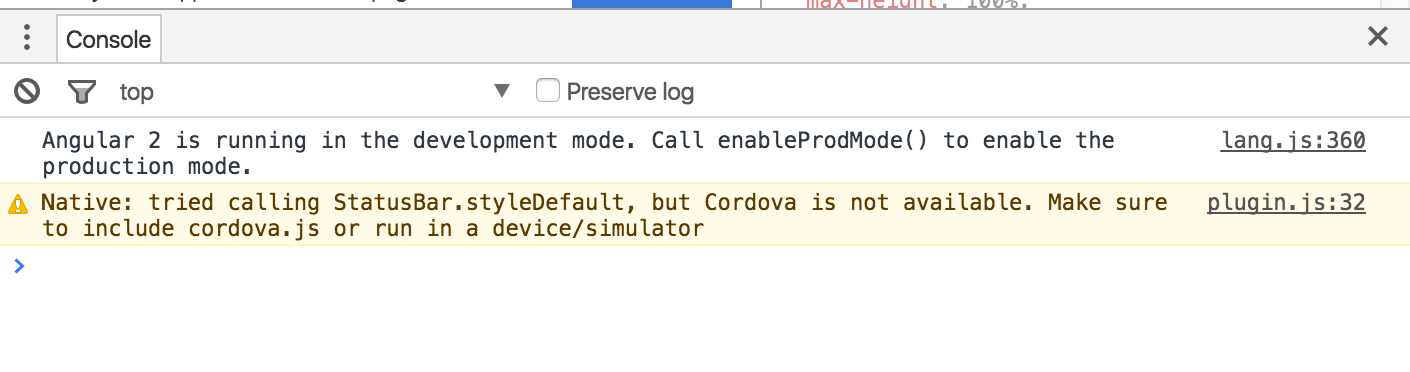
### Runtime Diagnostics
Spent way too long diagnosing an issue only to realize a plugin wasn't firing or installed? Ionic Native lets you know what the issue is and how you can resolve it.
2017-05-14 04:46:09 +02:00
2016-07-26 13:34:53 -05:00
2016-02-26 11:31:21 -06:00
## Plugin Missing?
2018-08-16 22:43:50 +02:00
2017-05-30 11:01:13 -04:00
Let us know or submit a PR! Take a look at [the Developer Guide ](https://github.com/ionic-team/ionic-native/blob/master/DEVELOPER.md ) for more on how to contribute. :heart:
2016-02-26 11:31:21 -06:00
2015-11-28 18:36:38 -06:00
# Credits
2017-05-14 04:46:09 +02:00
Ibby Hadeed - [@ihadeed ](https://github.com/ihadeed )
2016-03-15 14:12:21 -05:00
2018-07-02 10:59:40 +02:00
Daniel Sogl - [@sogldaniel ](https://twitter.com/sogldaniel )
2017-05-14 04:46:09 +02:00
Tim Lancina - [@timlancina ](https://twitter.com/timlancina )
2016-02-10 10:07:19 -06:00
2017-03-21 12:55:10 -05:00
Mike Hartington - [@mhartington ](https://twitter.com/mhartington )
2017-05-14 04:46:09 +02:00
Max Lynch - [@maxlynch ](https://twitter.com/maxlynch )
2015-11-28 18:36:38 -06:00
Rob Wormald - [@robwormald ](https://twitter.com/robwormald )
